

 The artifact view allows the user to edit the specific fields and structure of artifact objects (beyond the base properties). This view will dynamically respond to the type of artifact object (
table or document) as well as any selections in that document, such as when selecting a table cell within a document.
Document
Documents are structured using blocks which can be given different display types, such as a bulleted list, heading, or simple paragraph. These blocks can also be references to other artifact objects, like a table. In these blocks the editing panel will respond to what kind of object is being edited. When viewing a document type object or interacting with text blocks (in either tables or documents) the top panel will show editing features aimed for text operations and block inserts.During live collaboration only one user can edit a given block at a time.
@ which will place the reference at the position.
When inserting references the default is name field. To edit this right click the reference to change its display. Only name and value can be used. For value it will display both the resolved value and its unit.
Table
Table cells can be either text, equations or a reference to an object. Text cells can have paragraphs or lists (bulleted or numbered) and include all the same text editing features as a document block.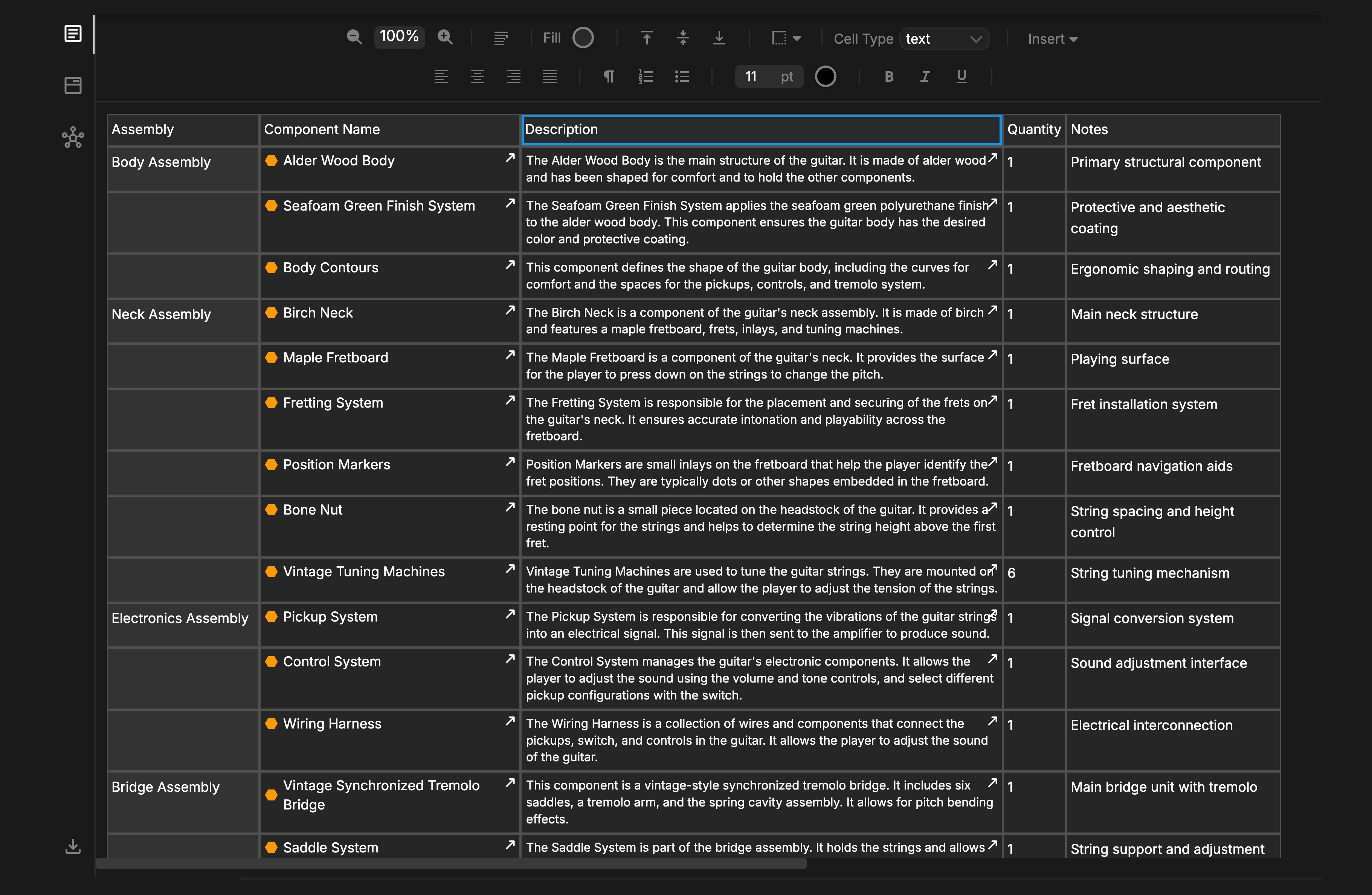
During live collaboration only one user can edit a cell at a time.
name, documentation and value.
The value of the reference cell can be directly edited from the top pane which updates the data in that object.
Tables inside of documents will always default to max page width.