

The Home page is the first thing you see after signing in to Davinci. It provides quick access to all of your Projects, recent activity, and the ability to create or import new Projects.Documentation Index
Fetch the complete documentation index at: https://docs.davinci-app.com/llms.txt
Use this file to discover all available pages before exploring further.
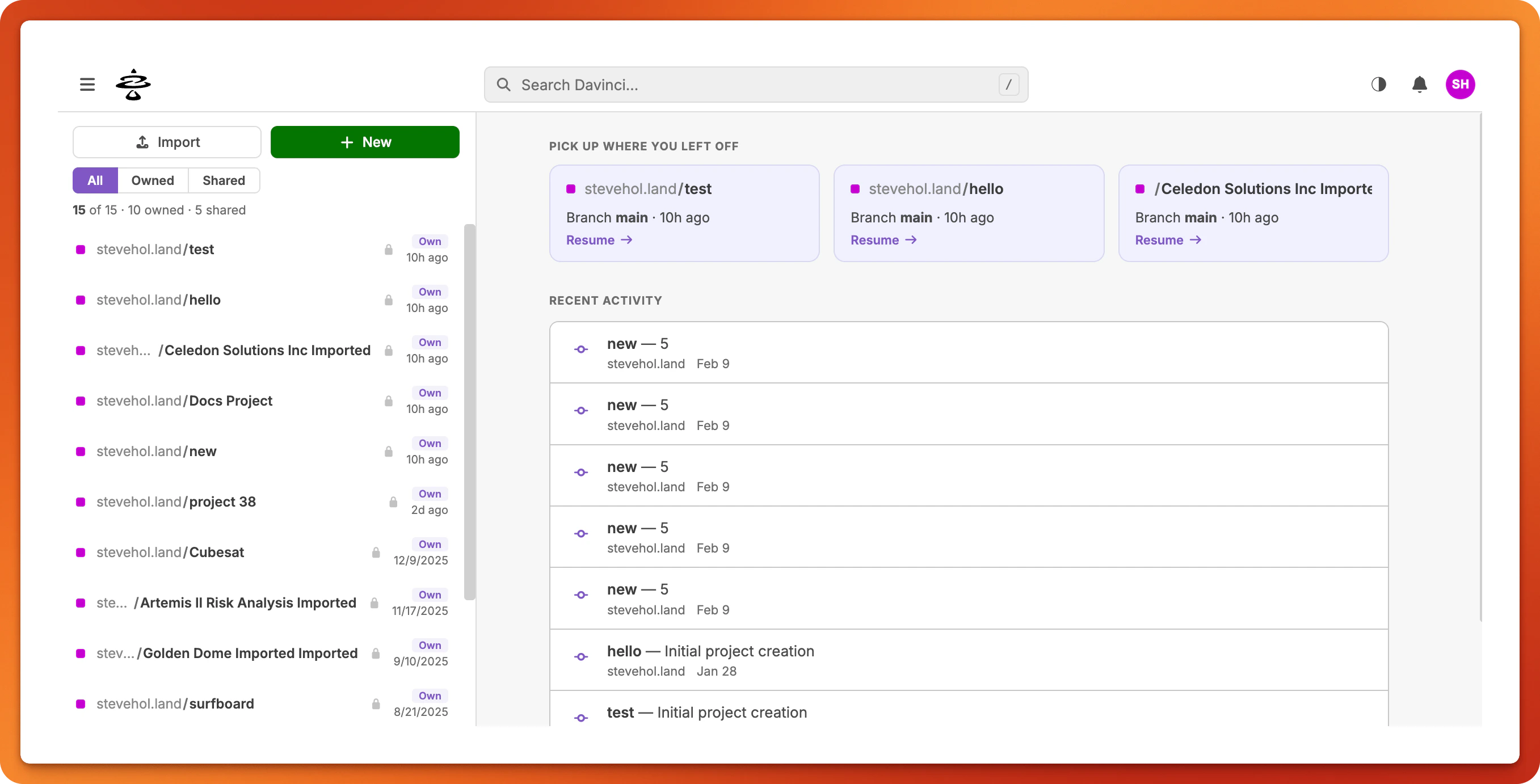
Sidebar
The left sidebar displays your full project list. At the top of the sidebar are two buttons:New— opens the New Project dialogImport— opens the Import Project dialog
- All — shows every project you have access to
- Owned — shows only projects you created. These contribute to your storage usage.
- Shared — shows projects owned by other users where you are a collaborator. These do not count against your storage.
Main Content
The main area of the Home page shows:- Resume Cards — your most recent projects are displayed at the top so you can quickly pick up where you left off.
- Recent Activity — a feed of recent events across your projects, such as commits, new projects, and collaborator additions.
Project Page
When you click a project in the sidebar, you navigate to that project’s page. The Project Page has a header showing the project owner and name, a branch selector, and anOpen Project link that launches the Editor.
Below the header are tabs:
Overview
The default tab. Shows:- README — rendered project documentation, if configured
- About — creation date and owner
- Collaborators — the list of people who have access
- Branches — all branches in the project
- Recent Activity — the latest commits on the selected branch
History
A detailed commit history for the selected branch. Includes an activity graph, filters for author, date range, and message search, and pagination controls.Settings
Available to the project owner and authorized collaborators. Contains:- Project Name — rename the project
- Visibility — set to Private or Public
- Project ID — the internal identifier
- Collaborators — add or remove collaborators, manage roles, and view pending invitations
- Danger Zone — delete the project (requires confirmation)
Create a Project
- Click the
Newbutton in the sidebar (or click the prompt card if this is your first project). - In the dialog that appears, enter a Project Name.
- Select a Visibility level:
- Private — only you and invited collaborators can see the project
- Public — visible to anyone
- Click
Create Project. The new project will appear in your sidebar project list.
Import a Project
- Click the
Importbutton in the sidebar. - In the dialog that appears, drag and drop a file onto the drop zone, or click to browse for a file. Accepted formats are
.DAFand.JSON. - Click
Import. Davinci will process the file and open the imported project in the Editor.
Projects exported and imported using .DAF will retain all Reference Objects, whereas .JSON exports will not.
Delete a Project
- Navigate to the project’s Settings tab.
- Scroll to the Danger Zone section at the bottom.
- Click
Delete Projectand confirm the deletion in the dialog.
Only projects you own can be deleted. Shared projects can only be deleted by their owner.
Navigation Menu
The hamburger menu in the top-left corner opens a navigation drawer with links to:- Home — return to the Home page
- Projects — your full project list
- Team — the Team hub (if you are on a team plan)
- Notifications — your notification inbox
- Docs — the Davinci documentation site
Top Bar
The top bar also provides:- A search bar for finding projects and users
- A theme toggle for switching between light and dark mode
- A notification bell with a dropdown for quick access to recent notifications
- Your avatar which opens a menu with links to your Profile, Settings, and Log out